On November 18, 2026, nginx released versions 1.31.9 and 1.30.7 with fixes for ten vulnerabilities. Five of them were disclosed together as nginx2root. This post covers CVE-2026-123007, an integer underflow in nginx's HTTP/2 flow-control accounting. It has been in nginx since version 1.9.5, released in September 2015, the release that added HTTP/2 support. It is one of two nginx2root bugs in HTTP/2. The other is CVE-2026-123633, a use-after-free.
F5's advisory credits four research teams for reporting the bug. Three of them have demonstrated remote code execution, and one published a working exploit with step-by-step instructions. Under the conditions listed below, the exploit runs a command as the nginx worker process, with no credentials. The fix was committed to nginx's public GitHub repository on November 11, a week before the release.
At a glance
- CVE: CVE-2026-123007, part of the five-bug nginx2root disclosure
- Severity: CVSS 4.0 9.2, Critical (CVSS 3.1: 8.1, High). nginx rates it major.
- Component: nginx HTTP/2 module (
ngx_http_v2) - Impact: unauthenticated code execution as the nginx worker user. A public exploit is available.
- Affected: nginx 1.9.5 through 1.31.8, when HTTP/2 is enabled
- Fixed: nginx 1.31.9 (mainline) and 1.30.7 (stable), and distribution backports
- What the public exploit needs: a direct connection to nginx (no proxy in front that handles HTTP/2 itself), enough bandwidth to send about 119 GiB within nginx's one-hour connection limit, an otherwise idle server, and an x86-64 server CPU with AVX-512
- Exploited in the wild: None reported as of November 20, 2026. CVE-2026-123007 is not in CISA's Known Exploited Vulnerabilities catalog, and CERT-EU's advisory reports no exploitation in the wild.
How the Bug Works
HTTP/2 flow control gives each stream, and the connection as a whole, a send window: the number of response bytes the server may send before the client grants more credit. nginx tracks the connection window in h2c->send_window. It subtracts from the window when it queues response DATA, and adds the bytes back if a stream is cancelled before that DATA is sent.
The bug is a double refund:
- The client lets the server queue response DATA.
- The client grants fresh connection credit with a WINDOW_UPDATE frame.
- The client cancels the streams. Cleanup refunds the queued DATA on top of the credit just granted, and never checks the result against the protocol maximum,
NGX_HTTP_V2_MAX_WINDOW(2³¹−1).
Once the window is above the maximum, the check for later WINDOW_UPDATE frames computes MAX − window in unsigned arithmetic. The subtraction wraps around to a huge value, so nginx accepts enough extra credit to push the 64-bit counter past 2⁶³. Read as a signed number, the window is now negative. That value reaches a buffer-length calculation and then a memcpy with a length close to 2⁶⁴. That copy is what corrupts memory.
A copy that large would normally crash at once. The researchers' nginx2root write-up explains why it does not: glibc's x86-64 memcpy copies large buffers backwards in vector-sized chunks. With a length of 2⁶⁴−d, the computed end address wraps around to dest − d, so the copy overwrites a limited stretch of memory and then stops.
Two public tools use this bug. The full exploit builds on that limited overwrite to run a command. A smaller proof of concept (PoC) only crashes the worker.
What the attacker needs
- HTTP/2 enabled on a port the attacker can reach. The bug does not need TLS. We reproduced it over unencrypted HTTP/2 as well (see below).
- Bandwidth. The PoC sends about 60 GiB, and the full exploit about 119 GiB (roughly 128 GB). All of it has to arrive within nginx's default one-hour connection lifetime (
keepalive_time), so a connection slower than about 300 Mbit/s cannot finish in time. - A direct connection. The exploit's instructions warn that a proxy in between may change the HTTP/2 frames the exploit depends on (tested below).
- An idle server. The exploit's instructions report that earlier tests failed on servers that had already handled heavy traffic, and with 16 active clients (tested below).
- AVX-512 on the server CPU, for the published exploit. AVX-512 is a set of CPU instructions available on many x86-64 server CPUs. The exploit is tuned for the AVX-512 version of glibc's
memcpy, and its instructions say to stop if the CPU lacks theavx512fandavx512vlfeatures. The bug itself does not need AVX-512: we crashed a worker on a CPU without it.
What We Reproduced
We tested nginx 1.31.8 and the fixed 1.31.9 on two x86-64 Linux machines: a virtual machine whose emulated CPU does not support AVX-512, and an AWS server (c6i.xlarge) whose CPU does. The full exploit needs AVX-512, so we ran it only on the AWS server.
The crash
Against nginx 1.31.8, the PoC pushed the connection window past the maximum, then sent 2³² WINDOW_UPDATE frames, about 60 GiB in total, until the worker crashed. nginx's error log recorded the crash:
2026/11/19 09:34:46 [alert] 2279#2279: worker process 2281 exited on signal 11 (core dumped)The worker crashed on both machines, so crashing nginx does not need AVX-512.
A smaller published script tests only the first step, pushing the window past the maximum, over unencrypted HTTP/2. nginx 1.31.8 accepted the extra credit and kept the connection open.
The fix in 1.31.9
Against nginx 1.31.9, the PoC could not push the window past the maximum, and nothing crashed. The smaller script's extra credit was refused, and nginx closed the connection.
The source changes between 1.31.8 and 1.31.9 (in src/http/v2/) show how the fix works:
- A new counter,
h2c->send_queued, tracks bytes that are queued but not yet sent. It increases when DATA is queued and decreases when a frame is sent or refunded at cleanup. - Cleanup now refunds only DATA frames, which carry response bodies, not every queued frame.
- The WINDOW_UPDATE check becomes
window > NGX_HTTP_V2_MAX_WINDOW - h2c->send_window - h2c->send_queued. Bytes still waiting to be sent now count against the limit, so the attacker's extra credit is rejected as a flow-control error.
With the error log at the info level, the patched server logged the refusal:
client violated connection flow control: received WINDOW_UPDATE frame with window increment 4194304 not allowed for window 2144509996Turning off HTTP/2
With http2 off on nginx 1.31.8, the PoC could not connect. During the TLS handshake, the client and server agree on HTTP/2 or HTTP/1.1 through a TLS extension called ALPN. The PoC asks only for HTTP/2, and since version 1.21.4, nginx refuses the handshake when the two sides cannot agree on a protocol. nginx kept serving HTTP/1.1 requests.
Code execution
We ran the full exploit three times against nginx 1.31.8, with a command that creates a file. Each run created the file, owned by the nginx worker's user, in about 3 minutes. The first run sent 119 GiB and opened 16 extra connections.
The exploit's instructions restart nginx before each attempt, but we ran the second and third attempts without a restart. The exploit first leaks memory addresses to get around ASLR, the protection that randomizes where code sits in memory, and all three runs found the same addresses. nginx starts each new worker as a copy of its master process, so the replacement for a crashed worker has the same memory layout.
After the command ran, the worker exited with signal 6 (an abort), not the signal 11 (a segmentation fault) that the PoC causes.
The exploit ran on the same machine as nginx. Over a network, sending 119 GiB at 1 Gbit/s takes about 17 minutes.
What Stopped the Public Exploit
We tested each condition below once, against nginx 1.31.8.
- A reverse proxy that handles HTTP/2 itself. We put an nginx 1.31.9 reverse proxy in front of the vulnerable server. The proxy accepted HTTP/2 from the client and talked to the vulnerable server over HTTP/1.1. The exploit gave up within half a second. It expects each response to arrive as a single HTTP/2 DATA frame, and the proxy builds its own HTTP/2 responses, so that early check failed. It failed the same way with larger header buffers. The server behind the proxy still needs the patch.
- A per-IP connection limit (
limit_conn) of 4 or 8. The exploit opens 16 extra connections from one address, and failed when it tried to open them. - Light background traffic. With 4 clients repeatedly fetching a static page, the exploit could not leak the memory addresses it needs, and stopped. With 16 clients, it failed the same way.
limit_conn is not a fix. For HTTP/2, nginx counts each concurrent request as a separate connection, so a low limit also blocks ordinary clients that send many requests at once, and users who share an IP address.
Who Is Exposed
We counted servers that report nginx 1.31.8, the version the public exploit was built for, and offer HTTP/2. We ran the count with Shodan at 08:15 UTC on November 20. Shodan counts services, where each service is one IP address and port.
- The search
product:nginx version:"1.31.8" ssl.alpn:h2returned 9,679 services. - 97.5% of them were hosted on Amazon Web Services. The next largest host was Tencent, with 76 services.
- By country: United States, then Ireland, Germany, Japan, the United Kingdom, and Australia.
nginx 1.31.8 was the current mainline release from October 21 until November 18. Across all versions, Shodan recorded 749,814 nginx services offering HTTP/2.
These counts rely on the version string each server reports. Many servers hide their version, so Shodan cannot count them. Distributions backport fixes without changing the version string, so some patched servers still look vulnerable. Check package versions instead. On developer machines, Dev Machine Guard reports them for you (see How StepSecurity Helps).
We ran the same searches four times, on November 19 and 20:
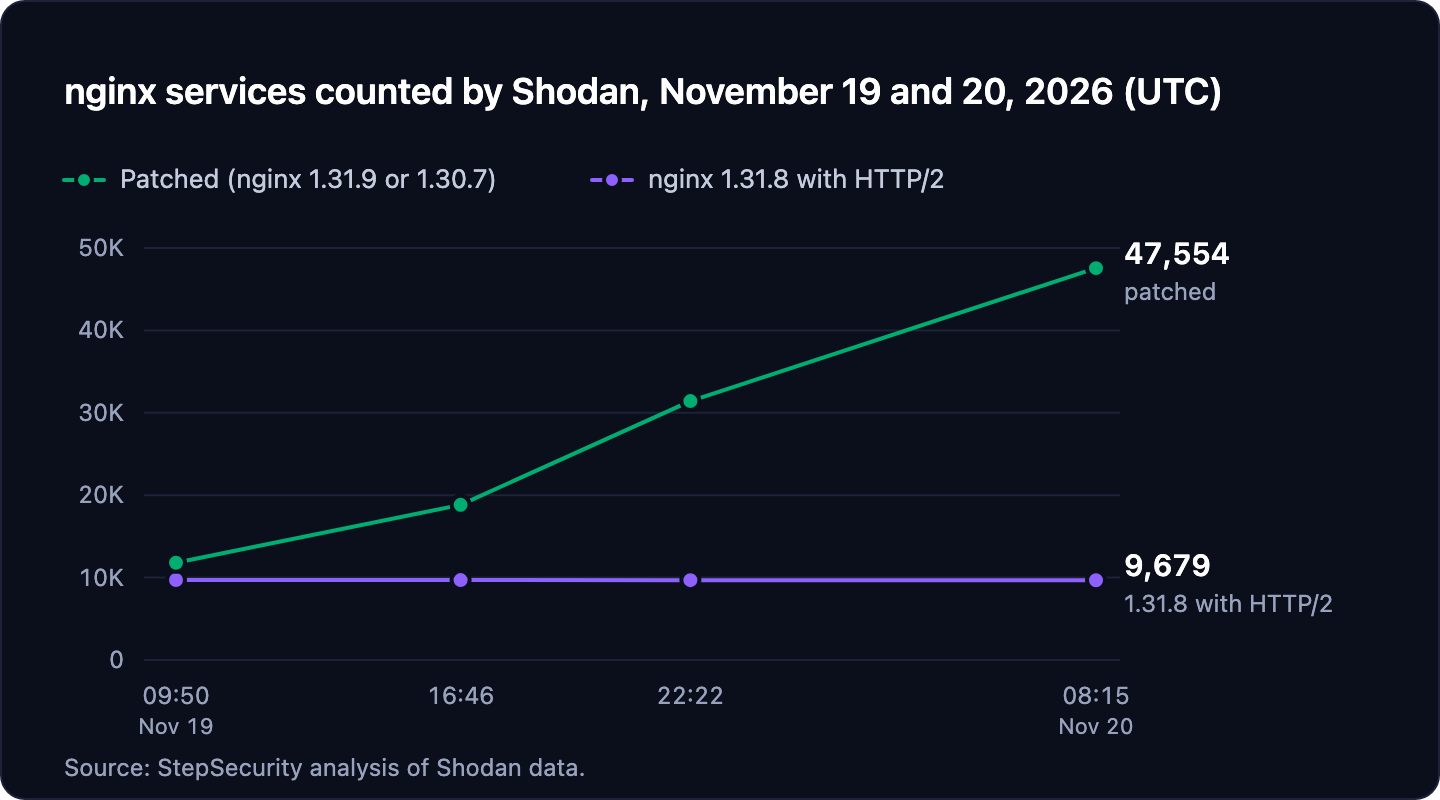
| Shodan search | Nov 19, 09:50 | Nov 19, 16:46 | Nov 19, 22:22 | Nov 20, 08:15 |
|---|---|---|---|---|
| nginx 1.31.9 or 1.30.7 (patched) | 11,803 | 18,830 | 31,421 | 47,554 |
| nginx 1.31.8 | 174,720 | 175,543 | 175,806 | 175,602 |
| nginx 1.31.8 with HTTP/2 | 9,704 | 9,700 | 9,691 | 9,679 |
Affected and Fixed Versions
| Product | Affected | Fixed |
|---|---|---|
| nginx Open Source | 1.9.5 to 1.31.8 | 1.31.9 (mainline), 1.30.7 (stable) |
| NGINX Plus | See F5 K000163926 | 37.0.8.1, 37.3.0.1. No fix for R34 to R36. |
| Debian 12 (bookworm) | Earlier package versions | 1.22.1-9+deb12u11 |
| Debian 13 (trixie) | Earlier package versions | 1.26.3-3+deb13u11 |
| Red Hat Enterprise Linux 8, 9, 10 | nginx packages | No fix as of November 20 |
| Ubuntu 22.04 LTS | Earlier package versions | 1.18.0-6ubuntu14.23 |
| Ubuntu 24.04 LTS | Earlier package versions | 1.24.0-2ubuntu7.20 |
| Ubuntu 26.04 LTS | Earlier package versions | 1.28.3-2ubuntu1.13 |
| Ubuntu 26.10 | Earlier package versions | 1.30.4-7ubuntu1.2 |
Debian's fixes are in DSA-6642-1 and DLA-4918-1. Ubuntu's fixes are in USN-9159-1, and older Ubuntu releases have fixes through Ubuntu Pro. Red Hat rates the bug Critical, but as of November 20 it has not released fixed nginx packages for RHEL 8, 9, or 10. Until it does, turn off HTTP/2 on those servers (step 4 below). Distribution packages keep the upstream version number: on Ubuntu 22.04, the fixed package still reports nginx/1.18.0. For other distributions, check your vendor's tracker.
What to Do Now
1. Find nginx servers with HTTP/2 enabled
Check the configuration on each server. nginx -T needs to read your TLS keys, so run it as root:
sudo nginx -T | grep -nE '^\s*http2\s+on|listen\s.*\bhttp2\b'Check from outside, too:
openssl s_client -connect example.com:443 -servername example.com -alpn h2,http/1.1 </dev/null 2>/dev/null | grep 'ALPN protocol'ALPN protocol: h2 means HTTP/2 is reachable. ALPN protocol: http/1.1 means it is not. If a CDN or load balancer sits in front of the server, this tests the CDN, so also test the nginx server behind it directly.
Kubernetes ingress-nginx enables HTTP/2 by default (use-http2: "true" in its ConfigMap). Kubernetes ended maintenance of ingress-nginx in March 2026 and no longer ships releases or security fixes for it, so no patched controller will come. Set use-http2: "false" or move to another ingress controller.
2. Upgrade and restart
Upgrade to nginx 1.31.9 or 1.30.7, or to your distribution's fixed package. NGINX Plus users need 37.0.8.1 or 37.3.0.1. F5 lists no fix for R34 to R36, so those branches need an upgrade to a fixed branch.
Then restart nginx:
sudo systemctl restart nginxA configuration reload (nginx -s reload) does not load a new binary. The master process keeps running the old code and starts new workers from it. Only a restart, or nginx's on-the-fly binary upgrade (the USR2 signal), replaces the running code.
3. Confirm the fix by package version
Distributions backport fixes without changing the upstream version number, so nginx -v and external version scans cannot confirm a fix. Compare the installed package version against your distribution's advisory:
dpkg -l 'nginx*' | grep ^ii    # Debian, Ubuntu
rpm -qa 'nginx*'               # RHEL, Fedora, Amazon Linux
For containers, rebuild from a fixed base image and redeploy. A running container keeps the binary it started with.
4. If you cannot patch yet, turn off HTTP/2
nginx offers HTTP/2 on an HTTPS port when the http2 directive is on for that server, or when its listen directive includes the http2 parameter. Turning HTTP/2 off means removing both:
- Run the
nginx -Tcheck from step 1 to find everyhttp2 on;line and everylistendirective with thehttp2parameter. - Remove them, or change
http2 on;tohttp2 off;. On nginx 1.25.1 and later,http2is off unless you turn it on. - Reload nginx, then run the
opensslcheck from step 1. It should reportALPN protocol: http/1.1.
This blocks both HTTP/2 bugs. It also breaks gRPC through nginx, because nginx's gRPC module requires HTTP/2. It does not protect against the other three nginx2root bugs.
How to Spot Exploitation Attempts
Worker crashes. exited on signal 11 matches the PoC and can indicate an attempt, especially right after heavy HTTP/2 traffic. In our tests, successful exploit runs ended with exited on signal 6 after the command ran. Treat signal 6 after a burst of heavy traffic as a possible compromise. The log may say (core dumped) even when no core file was written, so do not rely on finding one.
grep -E 'exited on signal (6|11)' /var/log/nginx/error.logOne connection carrying 60 GiB or more. The PoC sends about 60 GiB, and the exploit about 119 GiB, over one TLS connection. The exploit also opens 16 more connections from the same address. WINDOW_UPDATE frames are not requests, so they never appear in access logs. Look at open connections instead:
ss -tin state established '( sport = :443 )'Watch for a single client connection with a very large bytes_received value.
Unusual request patterns. The PoC and the exploit also send ordinary requests, which do appear in access logs. In our tests, those came in bursts of up to 350 requests a minute, most of them HEAD requests, with a few 400 (bad request) and 408 (request timeout) responses. Look for bursts of HEAD requests from a single address.
Processes started by the nginx worker. An nginx worker should not start other programs. The researchers' write-up recommends an auditd rule that logs every program started under the worker's user ID. Debian and Ubuntu packages run the worker as www-data, and nginx.org packages run it as nginx. Find its user ID with id -u www-data or id -u nginx, and use it in place of 101 below.
sudo auditctl -a always,exit -F arch=b64 -S execve,execveat -F euid=101 -k nginx_worker_exec
sudo ausearch -k nginx_worker_exec -i
Check that auditd is actually recording before you rely on the rule. On our test server it recorded nothing, even with no filter. Run a command as the worker's user and confirm it appears in the ausearch output.
How StepSecurity Helps
Developers also install nginx on their own machines, with Homebrew or apt, to run local stacks and test configurations. A patch rollout aimed at servers does not reach those copies. StepSecurity Dev Machine Guard inventories the system packages on each developer machine it runs on, so you can find those copies and confirm they get updated.
Find nginx on developer machines
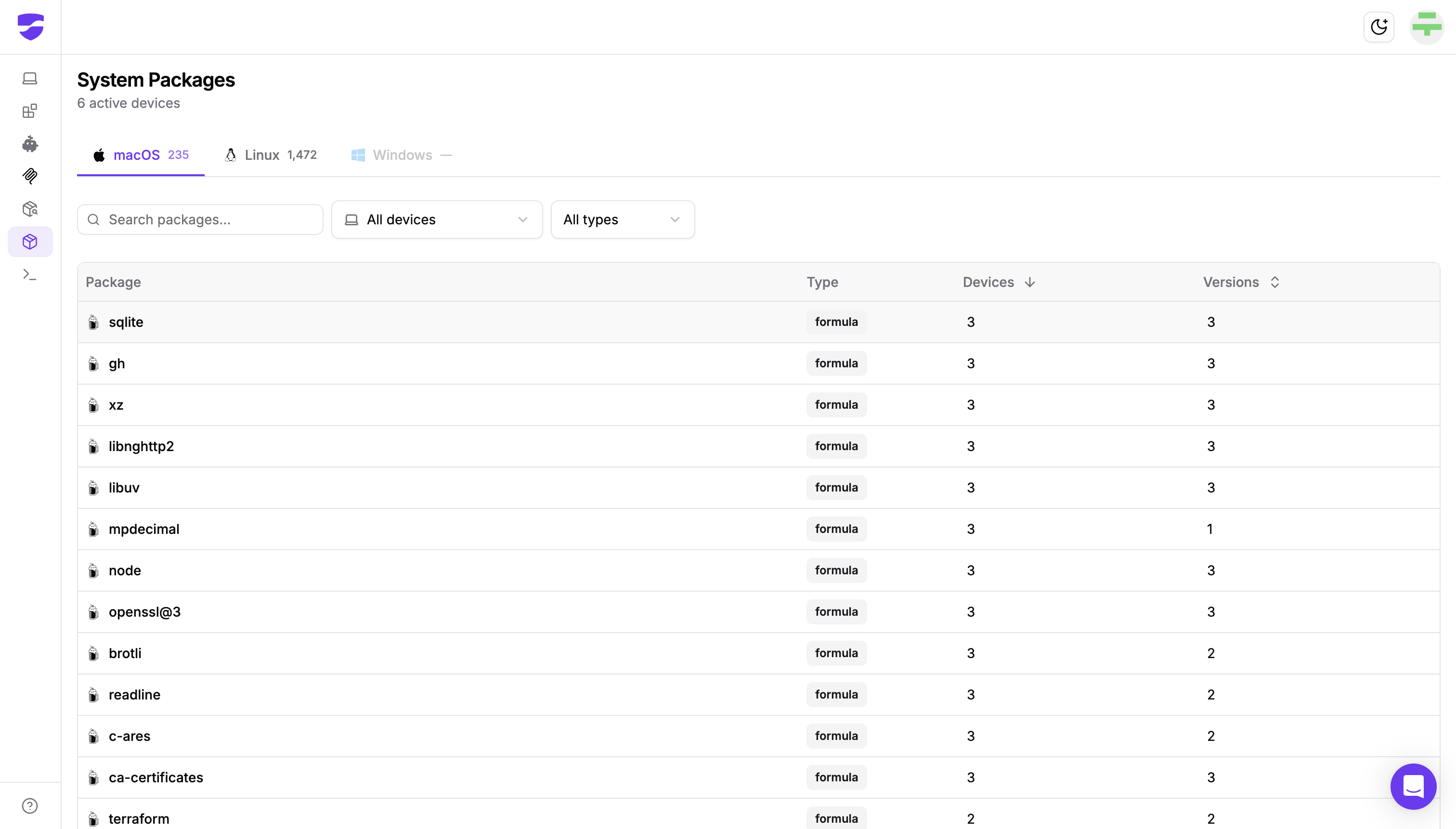
The System Packages page lists the OS-level packages Dev Machine Guard detects on enrolled macOS and Linux machines: Homebrew formulae on macOS, and packages from distribution package managers such as apt, dnf, and pacman on Linux.
- Open System Packages and select the macOS or Linux tab.
- Search for
nginx. - Open the package. The details panel shows every installed version with the number of devices running it, followed by the list of devices that have nginx installed.
Compare each version with the fixed releases: 1.31.9 or 1.30.7 for Homebrew installs. For Linux packages, Dev Machine Guard records the full package version, such as 1.18.0-6ubuntu14.23, so you can compare it directly with your distribution's advisory. If any installed version is vulnerable, use the device list to target the update, for example with an MDM script. Then use the configuration check in What to Do Now to see which of those machines have HTTP/2 enabled.
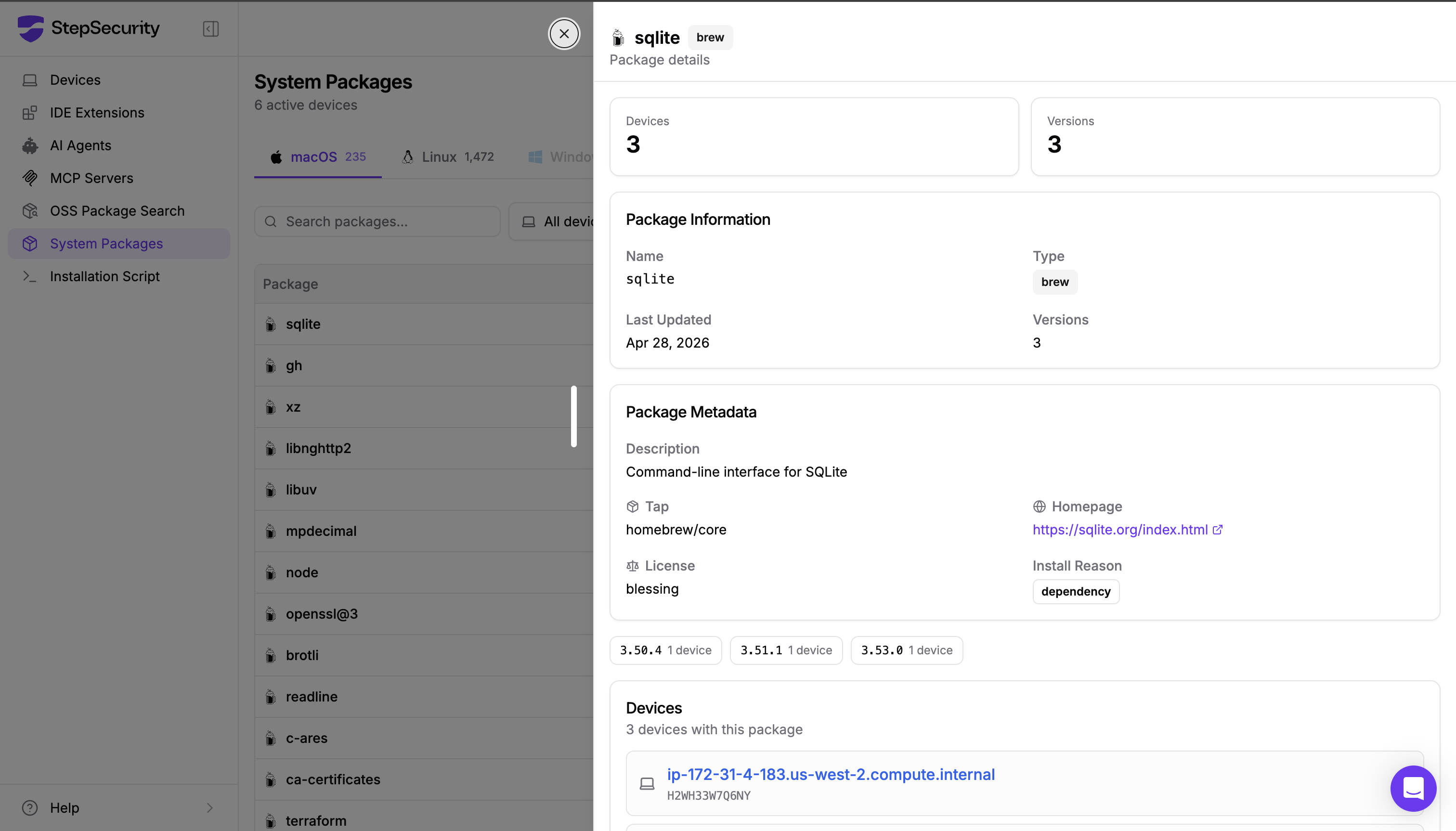
sqlite. View full size.Confirm the update reached every machine
Dev Machine Guard scans each machine every 4 hours by default. During the rollout, add a temporary boost in Dev Machine Guard Settings to scan more often, for example every 60 minutes until an end time you set. The change reaches your fleet on the next agent check-in, with no redeploy, and the regular schedule returns automatically. Schedules and boosts apply to machines running agent 1.15.0 or later. To check one machine right away, run the Dev Machine Guard script on it for an on-demand scan.
Then open the nginx package again. When its version list shows only fixed versions, every active machine with nginx installed is on a fixed release. The Devices page shows each machine's status and last scan, so you can follow up on any machine that has not reported recently.
Ask from your AI coding assistant
The same inventory is available through the StepSecurity MCP server. Connect it to Claude Code, Cursor, or another MCP client and ask, for example, "Which developer machines have nginx installed?"
References
- nginx security advisories
- nginx changelog
- nginx fix commit e27f5fa, "HTTP/2: account for queued frames when validating WINDOW_UPDATE"
- F5 K000164058: Out-of-band Security Notification (November 18, 2026)
- F5 K000163926: CVE-2026-123007
- CVE record: CVE-2026-123007
- Debian security tracker: CVE-2026-123007
- Red Hat CVE page: CVE-2026-123007
- Ubuntu CVE page: CVE-2026-123007
- CERT-EU Security Advisory 2026-022
- nginx
limit_conndocumentation - ingress-nginx ConfigMap reference
- Kubernetes: Ingress NGINX retirement
All testing ran against systems we own.
Find nginx and other system packages across your developer machines. Talk to the StepSecurity team about Dev Machine Guard.